AI provider settings
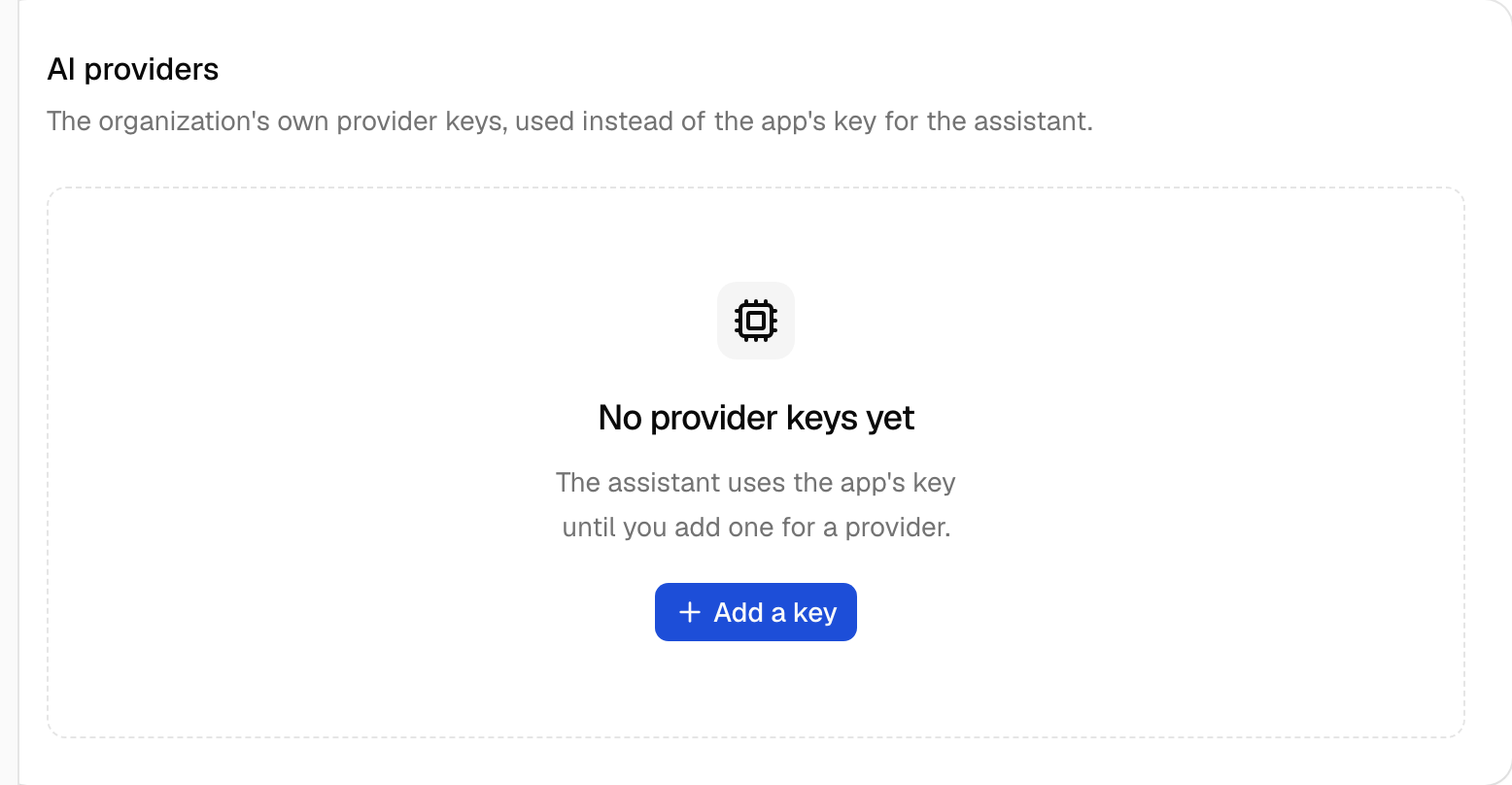
A settings card that lists the organization's own AI provider keys and models, adds a key to Vault and removes one. It loads its data on the server through the block's client.
Add the components
terminal npx shadcn add alert alert-dialog badge button card dialog empty field input select skeleton tableInstall the glue
Install the block with
npx better-supabase add ai-providers. The glue items are copied into your app, so edit them as you need.None: the page calls the block's client on the server.
Write the component
React and shadcn
View in the exampleai-provider-settings.tsx "use client"; import { useAction } from "better-supabase/react"; import { CpuIcon, PlusIcon, Trash2Icon } from "lucide-react"; import { useExtracted, useFormatter } from "next-intl"; import { type SubmitEvent, useId, useState, useTransition } from "react"; import { toast } from "sonner"; import { Alert, AlertAction, AlertDescription, AlertTitle, } from "@/components/reui/alert"; import { Badge } from "@/components/reui/badge"; import { AlertDialog, AlertDialogAction, AlertDialogCancel, AlertDialogContent, AlertDialogDescription, AlertDialogFooter, AlertDialogHeader, AlertDialogTitle, AlertDialogTrigger, } from "@/components/ui/alert-dialog"; import { Button } from "@/components/ui/button"; import { Card, CardAction, CardContent, CardDescription, CardHeader, CardTitle, } from "@/components/ui/card"; import { Dialog, DialogClose, DialogContent, DialogDescription, DialogFooter, DialogHeader, DialogTitle, DialogTrigger, } from "@/components/ui/dialog"; import { Empty, EmptyContent, EmptyDescription, EmptyHeader, EmptyMedia, EmptyTitle, } from "@/components/ui/empty"; import { Field, FieldDescription, FieldError, FieldGroup, FieldLabel, } from "@/components/ui/field"; import { Input } from "@/components/ui/input"; import { Select, SelectContent, SelectItem, SelectTrigger, SelectValue, } from "@/components/ui/select"; import { Skeleton } from "@/components/ui/skeleton"; import { Table, TableBody, TableCell, TableHead, TableHeader, TableRow, } from "@/components/ui/table"; import { useRouter } from "@/i18n/navigation"; import { useErrorMessage } from "@/lib/use-error-message"; import type { ProviderKeyRow, ProviderKeysRead } from "../ai-provider-queries"; import { addProviderKey, removeProviderKey } from "../ai-provider-actions"; import { PROVIDERS, type Provider } from "../ai-provider-options"; const PROVIDER_LABELS = { anthropic: "Anthropic", openai: "OpenAI", google: "Google", mistral: "Mistral", } satisfies Record<Provider, string>; const labelOf = (provider: string): string => { const known = PROVIDERS.find((slug) => slug === provider); return known ? PROVIDER_LABELS[known] : provider; }; function AddProviderKeyDialog({ variant }: { variant: "default" | "outline" }) { const t = useExtracted("aiProviders"); const fieldId = useId(); const errorMessage = useErrorMessage(); const [open, setOpen] = useState(false); const [provider, setProvider] = useState<Provider>("anthropic"); const [model, setModel] = useState(""); const [apiKey, setApiKey] = useState(""); const add = useAction(addProviderKey, { onSuccess: () => { setOpen(false); toast.success(t("Key saved")); }, }); const message = add.error === undefined ? null : errorMessage(add.error); const items = PROVIDERS.map((value) => ({ value, label: PROVIDER_LABELS[value], })); const submit = (event: SubmitEvent<HTMLFormElement>) => { event.preventDefault(); const trimmed = model.trim(); void add.run( trimmed ? { provider, apiKey, model: trimmed } : { provider, apiKey }, ); }; return ( <Dialog open={open} onOpenChange={(next) => { setOpen(next); setModel(""); setApiKey(""); add.reset(); }} > <DialogTrigger render={<Button size="sm" variant={variant} />}> <PlusIcon /> {t("Add a key")} </DialogTrigger> <DialogContent> <form onSubmit={submit} className="grid gap-6"> <DialogHeader> <DialogTitle>{t("Add a provider key")}</DialogTitle> <DialogDescription> {t( "The key goes to Vault under this organization. Requests then bill the organization's own provider account.", )} </DialogDescription> </DialogHeader> <FieldGroup> <Field> <FieldLabel htmlFor={`${fieldId}-provider`}> {t("Provider")} </FieldLabel> <Select value={provider} items={items} onValueChange={(value) => { const picked = PROVIDERS.find((known) => known === value); if (picked) { setProvider(picked); } }} > <SelectTrigger id={`${fieldId}-provider`} className="w-full"> <SelectValue /> </SelectTrigger> <SelectContent> {items.map((item) => ( <SelectItem key={item.value} value={item.value}> {item.label} </SelectItem> ))} </SelectContent> </Select> </Field> <Field> <FieldLabel htmlFor={`${fieldId}-model`}>{t("Model")}</FieldLabel> <Input id={`${fieldId}-model`} value={model} onChange={(event) => { setModel(event.target.value); }} maxLength={120} placeholder="claude-sonnet-4.5" /> <FieldDescription> {t("Optional. Leave it empty to use the app's default model.")} </FieldDescription> </Field> <Field data-invalid={message ? true : undefined}> <FieldLabel htmlFor={`${fieldId}-api-key`}> {t("API key")} </FieldLabel> <Input id={`${fieldId}-api-key`} type="password" autoComplete="off" value={apiKey} onChange={(event) => { setApiKey(event.target.value); }} required minLength={8} maxLength={500} /> {message ? <FieldError>{message}</FieldError> : null} </Field> </FieldGroup> <DialogFooter> <DialogClose render={<Button type="button" variant="outline" />}> {t("Cancel")} </DialogClose> <Button type="submit" disabled={add.pending}> {t("Save key")} </Button> </DialogFooter> </form> </DialogContent> </Dialog> ); } function RemoveKeyButton({ providerKey }: { providerKey: ProviderKeyRow }) { const t = useExtracted("aiProviders"); const errorMessage = useErrorMessage(); const label = labelOf(providerKey.provider); const remove = useAction(removeProviderKey, { onError: (error) => { toast.error(errorMessage(error)); }, }); return ( <AlertDialog> <AlertDialogTrigger render={ <Button type="button" variant="ghost" size="icon-sm" aria-label={t("Remove the {provider} key", { provider: label })} /> } > <Trash2Icon /> </AlertDialogTrigger> <AlertDialogContent> <AlertDialogHeader> <AlertDialogTitle> {t("Remove the {provider} key?", { provider: label })} </AlertDialogTitle> <AlertDialogDescription> {t( "Its secret is revoked in Vault, and requests fall back to the app's own key.", )} </AlertDialogDescription> </AlertDialogHeader> <AlertDialogFooter> <AlertDialogCancel disabled={remove.pending}> {t("Cancel")} </AlertDialogCancel> <AlertDialogAction variant="destructive" disabled={remove.pending} onClick={() => { void remove.run({ id: providerKey.id }); }} > {t("Remove")} </AlertDialogAction> </AlertDialogFooter> </AlertDialogContent> </AlertDialog> ); } function ProviderRows({ keys }: { keys: readonly ProviderKeyRow[] }) { const t = useExtracted("aiProviders"); const format = useFormatter(); return ( <Table data-testid="ai-provider-keys"> <TableHeader> <TableRow> <TableHead>{t("Provider")}</TableHead> <TableHead>{t("Model")}</TableHead> <TableHead>{t("Status")}</TableHead> <TableHead className="hidden md:table-cell">{t("Updated")}</TableHead> <TableHead> <span className="sr-only">{t("Actions")}</span> </TableHead> </TableRow> </TableHeader> <TableBody> {keys.map((key) => ( <TableRow key={key.id}> <TableCell> <div className="flex flex-col gap-0.5"> <span className="font-medium">{labelOf(key.provider)}</span> {key.name === "default" ? null : ( <span className="text-xs text-muted-foreground"> {key.name} </span> )} </div> </TableCell> <TableCell> {key.model ? ( <span className="font-mono text-xs">{key.model}</span> ) : ( <span className="text-muted-foreground"> {t("App default")} </span> )} </TableCell> <TableCell> {key.enabled ? ( <Badge variant="success-light">{t("Enabled")}</Badge> ) : ( <Badge variant="secondary">{t("Disabled")}</Badge> )} </TableCell> <TableCell className="hidden whitespace-nowrap text-muted-foreground tabular-nums md:table-cell"> {format.dateTime(new Date(key.updatedAt), { dateStyle: "medium", })} </TableCell> <TableCell className="text-right"> <RemoveKeyButton providerKey={key} /> </TableCell> </TableRow> ))} </TableBody> </Table> ); } /** * The organization's own model provider keys (bring your own key), read on * the server through `aiProviders.keys.list`, with the model each one * calls. Saving a key stores it in Vault first; the row only names it. */ export function AiProviderSettings({ read }: { read: ProviderKeysRead }) { const t = useExtracted("aiProviders"); const errorMessage = useErrorMessage(); const router = useRouter(); const [retrying, startRetry] = useTransition(); const hasKeys = read.ok && read.keys.length > 0; return ( <Card data-recipe="ai-provider-settings"> <CardHeader> <CardTitle>{t("AI providers")}</CardTitle> <CardDescription> {t( "The organization's own provider keys, used instead of the app's key for the assistant.", )} </CardDescription> {hasKeys ? ( <CardAction> <AddProviderKeyDialog variant="outline" /> </CardAction> ) : null} </CardHeader> <CardContent> {read.ok ? ( read.keys.length === 0 ? ( <Empty className="border" data-testid="ai-providers-empty"> <EmptyHeader> <EmptyMedia variant="icon"> <CpuIcon /> </EmptyMedia> <EmptyTitle>{t("No provider keys yet")}</EmptyTitle> <EmptyDescription> {t( "The assistant uses the app's key until you add one for a provider.", )} </EmptyDescription> </EmptyHeader> <EmptyContent> <AddProviderKeyDialog variant="default" /> </EmptyContent> </Empty> ) : ( <ProviderRows keys={read.keys} /> ) ) : ( <Alert variant="destructive"> <AlertTitle>{t("The providers didn't load")}</AlertTitle> <AlertDescription>{errorMessage(read.error)}</AlertDescription> <AlertAction> <Button type="button" size="sm" variant="outline" disabled={retrying} onClick={() => { startRetry(() => { router.refresh(); }); }} > {t("Retry")} </Button> </AlertAction> </Alert> )} </CardContent> </Card> ); } const SKELETON_ROWS = ["first", "second"]; /** Keeps the card's title in the static shell, so the tab commits it at once. */ export function AiProviderSettingsSkeleton() { const t = useExtracted("aiProviders"); return ( <Card aria-busy="true"> <CardHeader> <CardTitle>{t("AI providers")}</CardTitle> <CardDescription> {t( "The organization's own provider keys, used instead of the app's key for the assistant.", )} </CardDescription> </CardHeader> <CardContent className="flex flex-col gap-2"> {SKELETON_ROWS.map((row) => ( <Skeleton key={row} className="h-11 w-full" /> ))} </CardContent> </Card> ); }